![White_Bowimi_Logo_2025.png]](https://help.bowimi.com/hs-fs/hubfs/White_Bowimi_Logo_2025.png?height=40&name=White_Bowimi_Logo_2025.png)
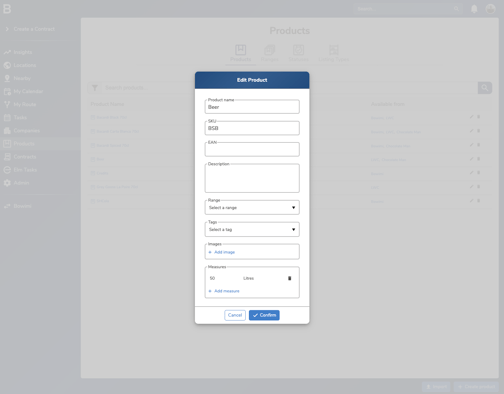
To start adding hectolitres to your contracts, you have to first add measures to your products. To do this, navigate to "Products" on the main menu, then click the "Edit" button on the product you want to add a measure to. You'll then see this modal (below), on the modal, click "Add measure" and add a measure (e.g. 50 litres, as you can see in the image below):
Now, you'll be able to add "Hectolitres" to contracts as forecasts or conditions (e.g. you're forecasting that they will sell 100 HL, or that they will receive one keg per 1 HL they buy) as you can see in this image:
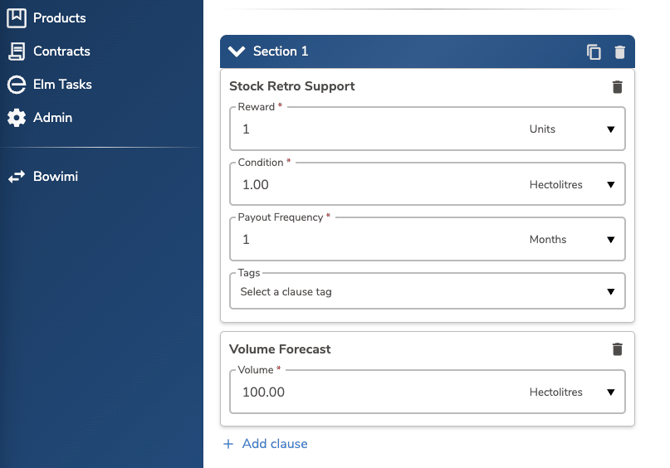
You can combine units (e.g. kegs) and HL in multiple different ways, you can have the support in kegs and the volume forecast in HL or vice versa.
Then when you save the contract, you'll be able to record orders of products and have it automatically convert them into HL for tracking volume progress (green progress bar below), against time through the contract (purple circle in front of green progress bar):

It can only convert orders into HL for products which have measures, so make sure you have applied measures to all of your relevant products.
Troubleshooting:
If you face any issues, please contact the Bowimi Support Team for help.