![White_Bowimi_Logo_2025.png]](https://help.bowimi.com/hs-fs/hubfs/White_Bowimi_Logo_2025.png?height=40&name=White_Bowimi_Logo_2025.png)
Pre-requisites:
- You must have admin access to import locations.
- If you do not see the admin tab or cannot perform the actions, please contact your leadership team or Bowimi Support.
- Product Name and Product Code are mandatory fields for the bulk upload.
Steps:
1. Prepare a CSV sheet with Product Name and Product SKU Code in separate Columns. Feel free to add another column for “Range” to group these products in categories within the system.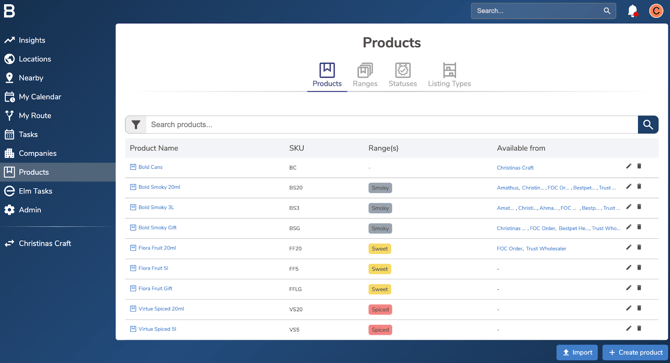
2. On the Product Tab, click the “Import” button located in the bottom corner of the page.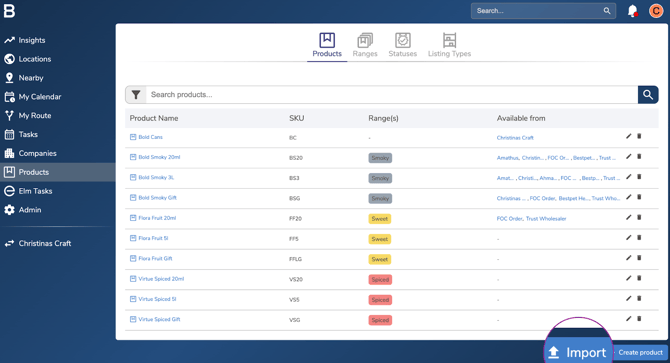
3. Select the file with the Product details from the pop up window on the screen and Map the columns with the fields.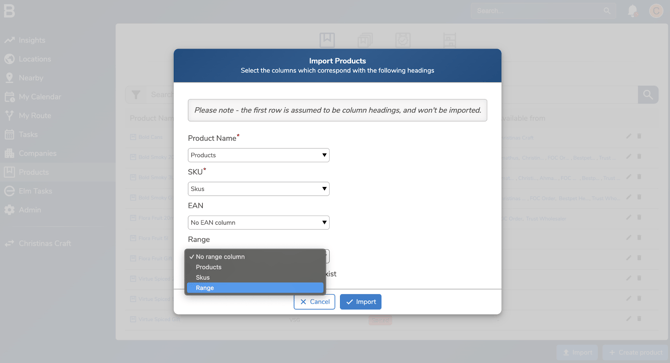
4. Mark “Create Ranges if they don’t exist” box and click “Import” to action the upload.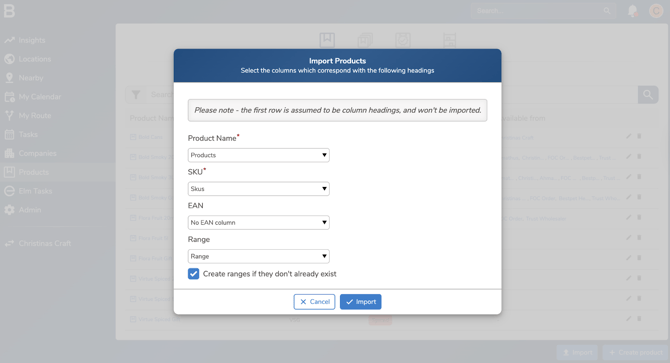
Troubleshooting:
- Can’t import the products?
- Your product list might have duplicates identified by the platform.
- To fix, remove duplicates via the Data tab of the sheet for Product SKU.
- Your product list might have duplicates identified by the platform.
- Still having issues?
- Contact the Bowimi Support Team for help.