![White_Bowimi_Logo_2025.png]](https://help.bowimi.com/hs-fs/hubfs/White_Bowimi_Logo_2025.png?height=40&name=White_Bowimi_Logo_2025.png)
Steps:
-
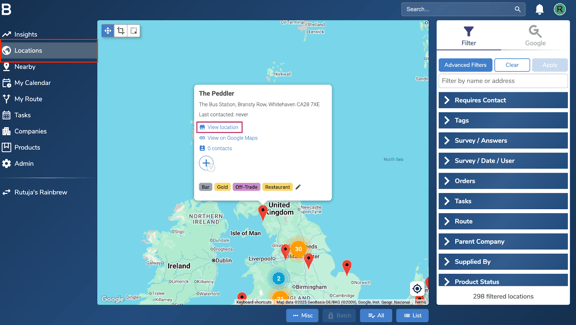
Navigate to the ‘Locations’ page in your account. Find the location you want to create a task for, then click on the “View Location” button.
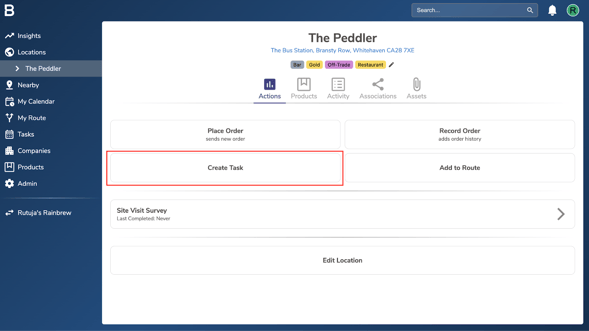
- Click “Create Task” on the actions page of the location.
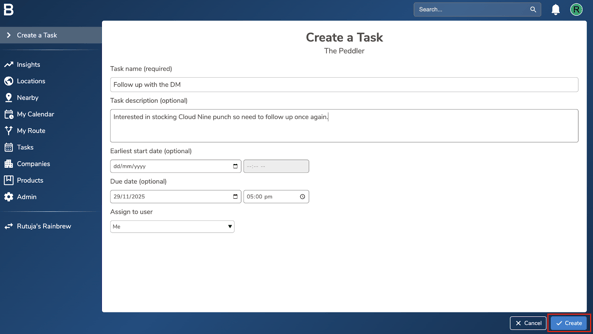
- Fill in the task details as needed and click “Create” at the bottom to create a task for that location.
Note:
i. Earliest start date allows you to set a time and day, before which the task cannot be resolved. This is handy if a task has to be done on a specific day and no sooner to avoid mistakes.
ii. You can assign the task to yourself or any other member of your team in the “Assign to User” column
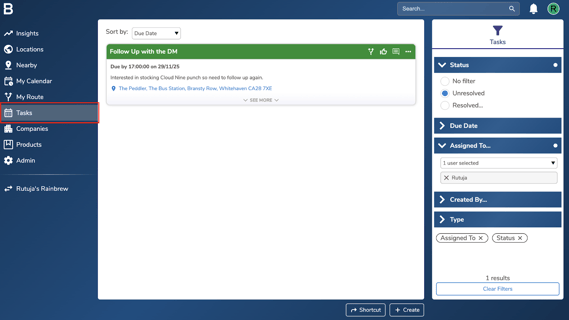
4. You can find the tasks created in the ‘Tasks’ page in your account.
Troubleshooting:
If you are still having any issues, please contact the Bowimi Support Team for help.