![White_Bowimi_Logo_2025.png]](https://help.bowimi.com/hs-fs/hubfs/White_Bowimi_Logo_2025.png?height=40&name=White_Bowimi_Logo_2025.png)
Please note: Any locations associated with the tag being deleted will not be removed. However, all activity linked to that tag will be permanently deleted from the system.
Pre-requisites:
- You must have Admin or Manager access to delete Tags.
- If you do not see the admin tab or cannot perform the actions, please contact your leadership team or Bowimi Support.
Steps:
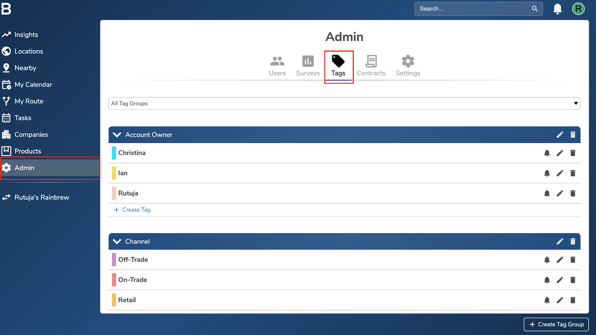
- Navigate to the “Admin” page in your account and click on the “Tags” tab.
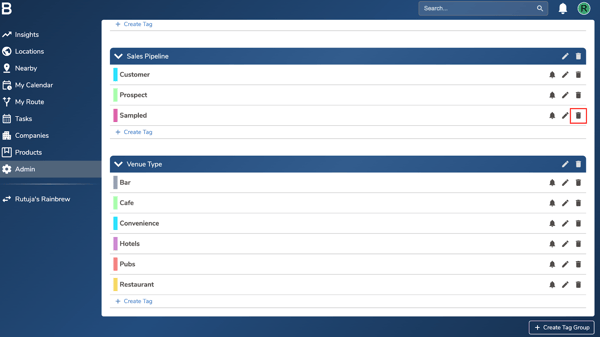
- Find the tag you want to delete and click the Delete (dustbin) icon beside the tag.
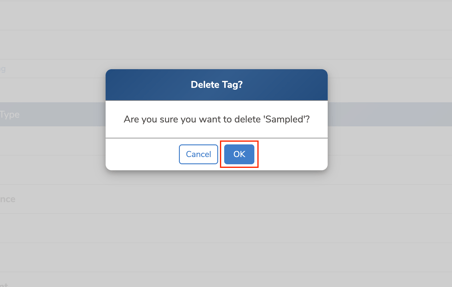
- Click ‘OK’ to delete the tag. Repeat the same process for any additional tags you’d like to delete.
Troubleshooting:
If you are still having any issues, please contact the Bowimi Support Team for help.