![White_Bowimi_Logo_2025.png]](https://help.bowimi.com/hs-fs/hubfs/White_Bowimi_Logo_2025.png?height=40&name=White_Bowimi_Logo_2025.png)
Pre requisites:
-
You must have Admin/Manager access to create or manage Tag groups.
-
If you do not see the admin tab or cannot perform the actions, please contact your leadership team or Bowimi Support.
Steps:
-
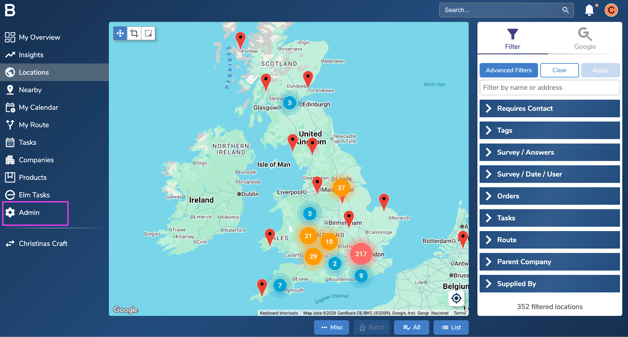
Navigate to Admin Tab on the account.
-
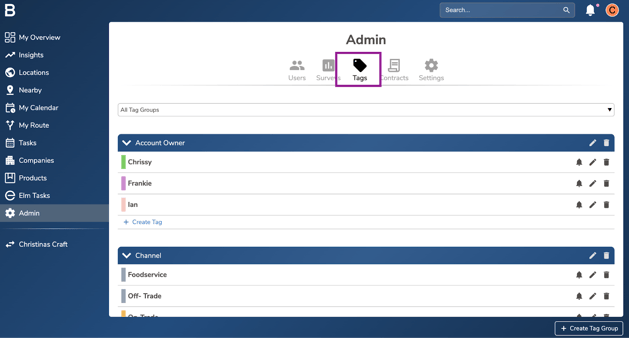
Click on the Tags tab to access the current tags active on the platform.
-
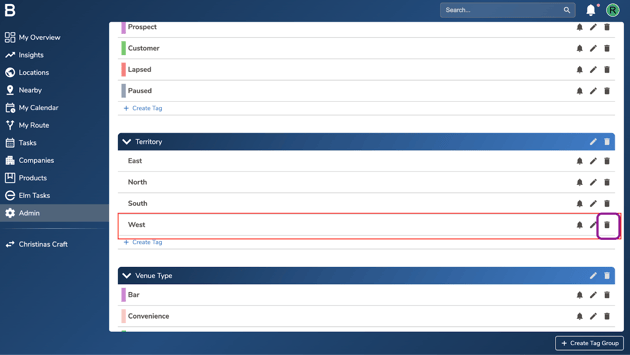
To delete a tag group, you’ll first need to delete the tags within it. Simply click the ‘bin icon’ next to each tag and remove them one by one. Once all tags are deleted, you’ll be able to delete the tag group.
-
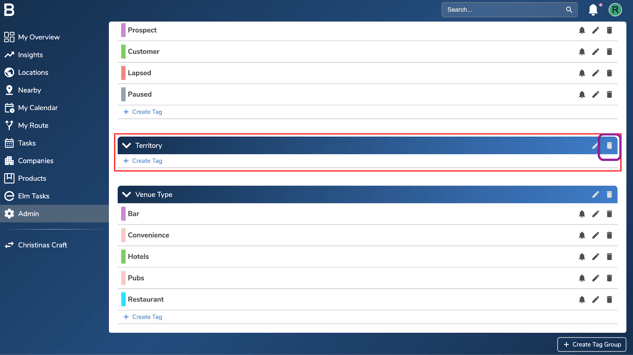
Once you’ve deleted all the tags within the tag group, click the ‘bin icon’ next to the tag group to delete it completely.
Troubleshooting:
-
In case of permissions error please reach out to your Admin or leadership team for accessibility.
-
Still having issues?
Contact the Bowimi Support Team for help.