![White_Bowimi_Logo_2025.png]](https://help.bowimi.com/hs-fs/hubfs/White_Bowimi_Logo_2025.png?height=40&name=White_Bowimi_Logo_2025.png)
Pre-requisites:
- You must have admin access to export locations.
- If you do not see the admin tab or cannot perform the actions, please contact your leadership team or Bowimi Support.
Steps:
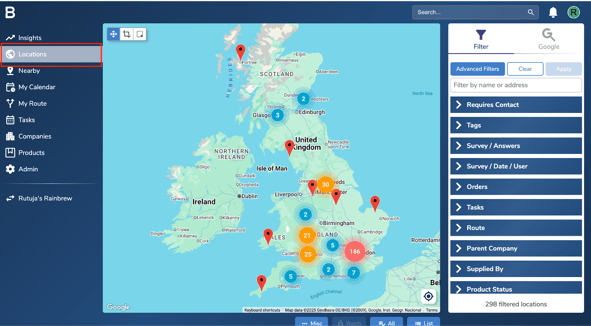
- Log into your Bowimi account and click on Locations.
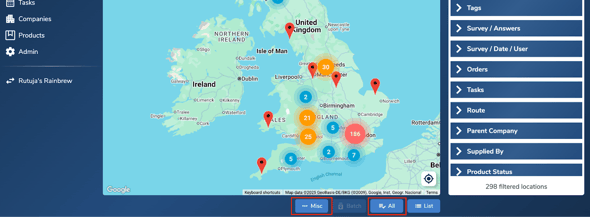
- Click the ‘All’ button at the bottom of the page and then click on ‘Misc’.
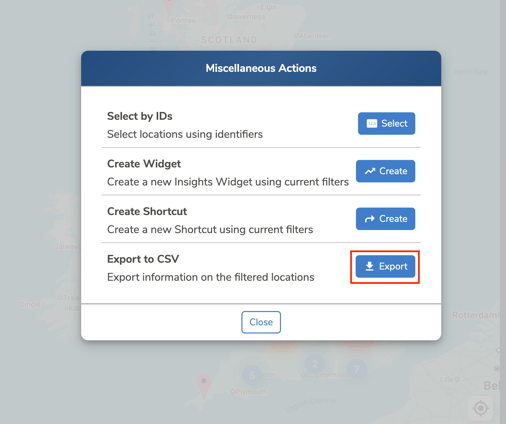
- Click ‘Export’ to download the locations in a csv file.
- If you’d like to export only specific locations, you can apply filters or tags using the options on the right-hand side of the Locations page, and then follow the same export steps.
Troubleshooting:
- If you get an error message while exporting data, we recommend re-checking the permissions.
- If you are still having issues, please contact the Bowimi Support Team for help.