![White_Bowimi_Logo_2025.png]](https://help.bowimi.com/hs-fs/hubfs/White_Bowimi_Logo_2025.png?height=40&name=White_Bowimi_Logo_2025.png)
Contracts are created in Bowimi as a single source of truth. These contracts can then:
- Move through the status pipelines
- Have Word/PDFs generated from them
- Have Word/PDFs stored against them
- Have sales volume and payments recorded against them
- Have PowerBI reports generated from their contents
Contract Structure
To understand how to create contracts, you need to first understand the anatomy and structure of contracts in Bowimi.
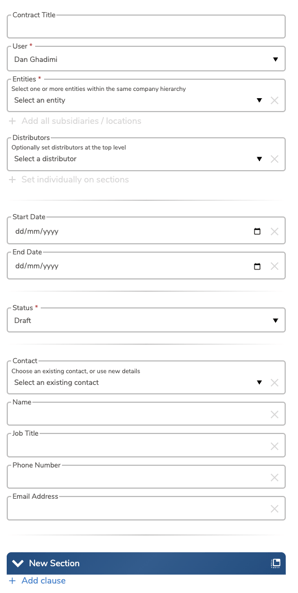
Contracts are made up of:
- Contract Title
- Contract Owner (User)
- Contracted Customer (Entities)
- Start / End Date
- Status
- Customer Contact Information (Name, Job Title, Phone Number, Email)
- Sections (groups of clauses)
Contract Sections
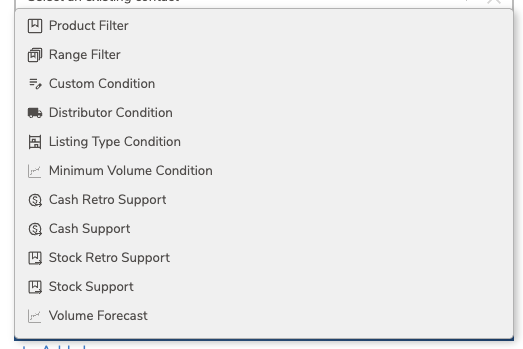
Contract sections operate independently of each other, with all clauses applying to the entire section. They are organized into the following groups:
A. Product and Range Filters
These clauses determine which products and ranges the section applies to.
- Product Filter: Specifies the applicable products.
- Range Filter: Specifies the applicable ranges (brands).
B. Conditions
These clauses set the mandatory requirements and rules for the contract section.
- Custom Condition: Free text field for typing specific contract conditions.
- Distributor Condition: Specifies the required distributors the customer must order from.
- Listing Type Condition: Specifies the applicable listing types and the minimum number of products that must respect this condition.
- Minimum Volume Condition: Specifies the minimum volume required for the section (in units, cases, or a measure e.g., hectolitre).
C. Support & Forecasting
These clauses define the financial/stock support and volume forecasts.
- Cash Support: Specifies a fixed cash amount and the date it will be paid.
- Cash Retro Support: Specifies the cash amount paid per unit/case/measure ordered, along with the payout frequency.
- Stock Support: Specifies a fixed stock amount and the date it will be provided.
- Stock Retro Support: Specifies the stock amount paid per unit/case/measure ordered, along with the payout frequency.
- Volume Forecast: Specifies the forecasted volume for the section (in units, cases, or a measure e.g., hectolitre).
Contract Sections Example
-
Product Filter: Grey Goose and Bacardi
-
Distributor Condition: LWC and Matthew Clark
-
Cash Support: £1000 paid on 09/02/2026, tag “Listing Fee”
-
Cash Retro Support: £2 per 1 case(12), paid every three months
-
Volume Forecast: 3000 units
In this example, for every 12 bottles of Grey Goose OR Bacardi ordered from LWC OR Matthew Clark, they would receive £2. The forecast is 3000 units, so the forecasted cash to be paid based on the cash retro is (3000/12) x £2 = £500. Plus the listing fee of £1000, the total cash value of the contract is £1500.
Video Walkthrough
This video will walk you through the contract creation process.
Troubleshooting:
If you are still having any issues, please contact the Bowimi Support Team for help.