![White_Bowimi_Logo_2025.png]](https://help.bowimi.com/hs-fs/hubfs/White_Bowimi_Logo_2025.png?height=40&name=White_Bowimi_Logo_2025.png)
Pre-requisites:
- You must have Admin or Manager access to manage/create listing types.
- If you do not see the admin tab or cannot perform the actions, please contact your leadership team or Bowimi Support.
Steps:
Creating a Listing Type
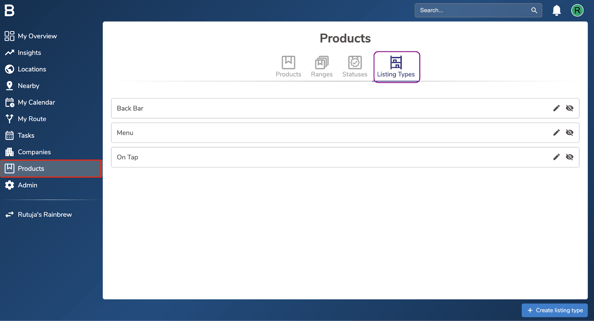
- Go on the “Products” tab in your account and then click “Listing Types”.
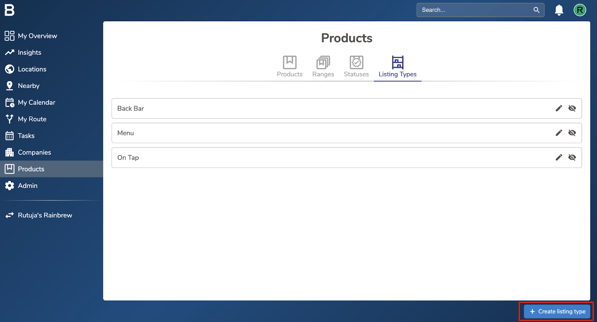
- Click the “Create listing type” button at the bottom of the screen.
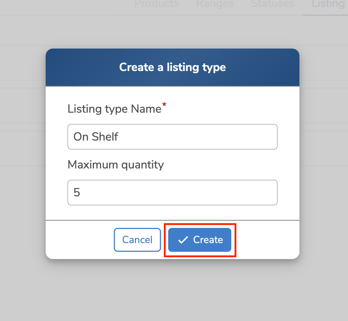
- Fill in the Listing Type Name and Maximum Quantity and click “Create” to create a new listing type.
Editing or Hiding Listing Types
-
Go on the “Products” tab in your account and then click “Listing Types”.
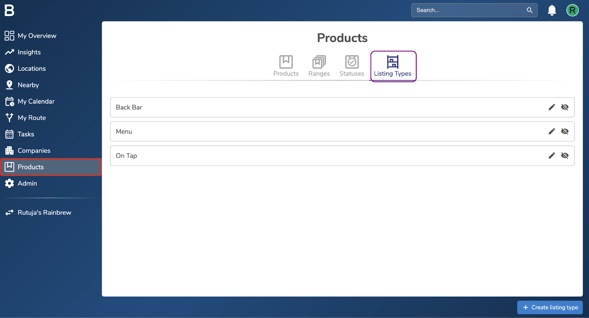
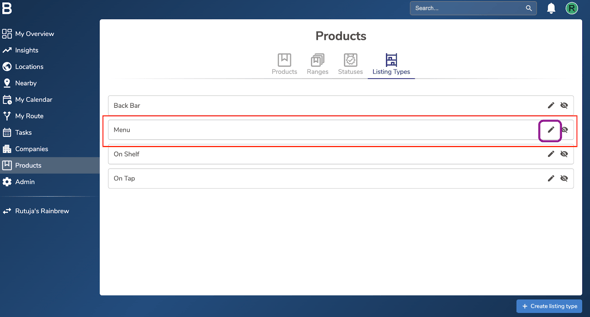
- To Edit a specific listing type, click the ‘pencil icon’ next to it. Update the name or quantity as needed, then click ‘Confirm’ to save your changes.
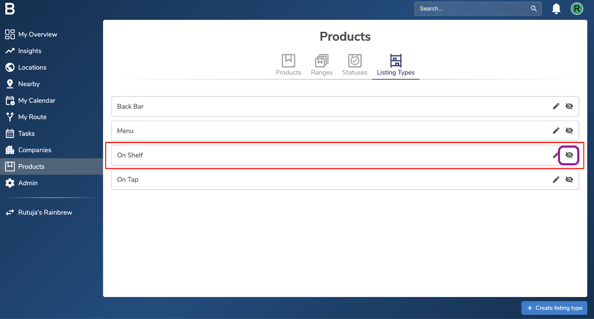
- To Hide a listing type, click on the ‘eye icon’ next to it. This will prevent the listing type from appearing in Bowimi.
To Unhide it, simply click the same icon again.
Troubleshooting:
If you are still having any issues, please contact the Bowimi Support Team for help.