![White_Bowimi_Logo_2025.png]](https://help.bowimi.com/hs-fs/hubfs/White_Bowimi_Logo_2025.png?height=40&name=White_Bowimi_Logo_2025.png)
Pre-requisites:
- You must have Admin or Manager access to manage product statuses.
- If you do not see the admin tab or cannot perform the actions, please contact your leadership team or Bowimi Support.
Steps:
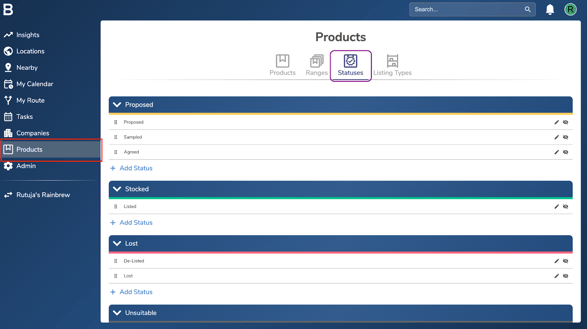
- Go on the “Products” tab in your account and then click “Statuses”.
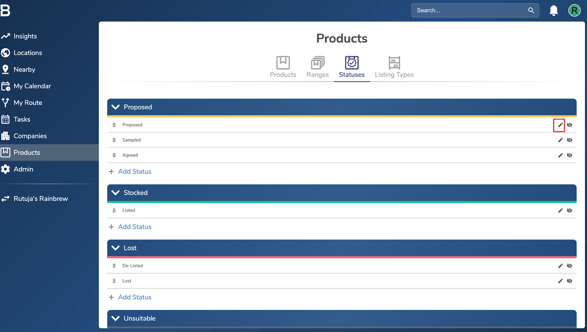
- i. To edit any of the existing statuses, click on the ‘Pencil icon’, edit the name and hit ‘Save’.
ii. To add a new product status, click ‘Add Status’ in the relevant group, enter the status name, and then click ‘Save’ to confirm.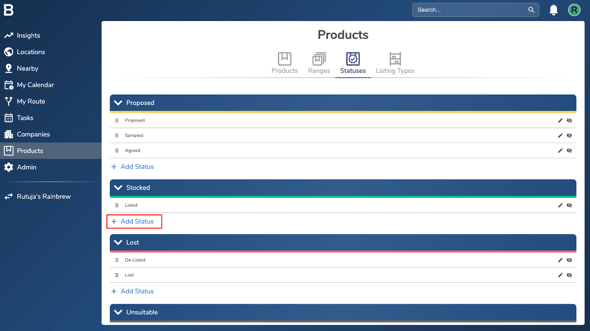
iii. To hide a specific product status from showing up in the account, click the ‘Eye’ icon next to it. The status will fade out, indicating it’s hidden. To unhide the status, simply click the ‘Eye’ icon again and it will become visible.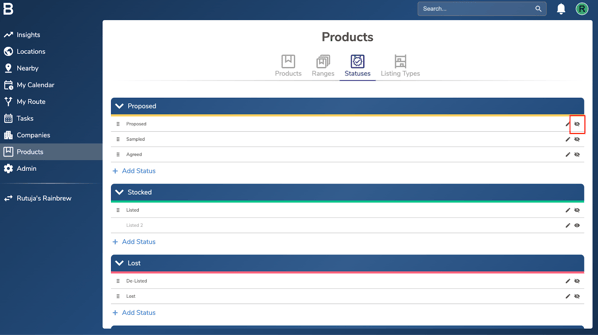
Note: You can still access the hidden status activities on insights/reports if needed.
Troubleshooting:
If you are still having any issues, please contact the Bowimi Support Team for help.